线性回归与图像卷积
《工科数学分析》寒假作业
一、线性回归与导数
1. 数据准备
这是2026年2月中国大陆二手车市场2023款 Tesla Model 3 后轮驱动版不同里程的估算成交价:
| Sample ID | Mileage(10k km) | Price(10k RMB) |
|---|---|---|
| 1 | 0.5 | 21.8 |
| 2 | 1.2 | 21.1 |
| 3 | 2.0 | 20.4 |
| 4 | 3.1 | 19.5 |
| 5 | 3.9 | 18.9 |
| 6 | 4.8 | 18.2 |
| 7 | 5.5 | 17.5 |
| 8 | 6.2 | 16.9 |
| 9 | 7.5 | 15.8 |
| 10 | 8.8 | 14.7 |
(数据参考多个二手车平台,由 AI 生成)
2. 定义损失函数
对于行驶里程和二手成交价两个变量,可以用一元线性回归模型来预测;其中, 是截距(Intercept), 是回归系数(Regression Coefficient)。
使用均方误差,衡量预测值和真实值间的差距(损失函数):
3. 数学推导
对于 和 的偏导公式分别为:
下文使用的偏导公式将忽略常数:
4. 手动迭代
规定初始参数 .
规定学习率 , 和 的更新规则为:
由上文推导出的公式,编写 Python 代码:
class LinearRegression:
    def __init__(self, indV=[], dV=[], beta0=1, beta1=1):
        self.indV = indV
        self.dV = dV
        self.beta0 = beta0
        self.beta1 = beta1
    def Loss(self):
        """
        损失函数
        """
        n = len(self.indV)
        numerator = 0 # 分子
        result = -1

        for val_x, val_y in zip(self.indV, self.dV):
            numerator += (val_y - (self.beta0 + self.beta1 * val_x)) ** 2
        result = numerator / n
        return result
    def partialFormula_beta0(self):
        """
        beta0的偏导公式
        """
        result = 0
        for val_x, val_y in zip(self.indV, self.dV):
            item = self.beta0 + val_x*self.beta1 - val_y
            result += item
        return result
    def partialFormula_beta1(self):
        """
        beta1的偏导公式
        """
        result = 0
        for val_x, val_y in zip(self.indV, self.dV):
            item = val_x * (val_x*self.beta1 + self.beta0 - val_y)
            result += item
        return result
    def iterateBeta0(self, eta):
        """
        迭代beta0
        """
        self.beta0 = self.beta0 - eta * self.partialFormula_beta0()
    def iterateBeta1(self, eta):
        """
        迭代beta1
        """
        self.beta1 = self.beta1 - eta * self.partialFormula_beta1()

def main():
    mileage = [0.5, 1.2, 2.0, 3.1, 3.9, 4.8, 5.5, 6.2, 7.5, 8.8]
    price = [21.8, 21.1, 20.4, 19.5, 18.9, 18.2, 17.5, 16.9, 15.8, 14.7]
    beta0 = 0
    beta1 = 0
    eta = 0.001 # 学习率
    mileagePrice = LinearRegression(mileage, price, beta0, beta1)
    for i in range(2001):
        if i % 100 == 0:
            print(f"No.{i} Result: {mileagePrice.Loss():.6f}")
        mileagePrice.iterateBeta0(eta)
        mileagePrice.iterateBeta1(eta)

if __name__ == "__main__":
    main()
根据该规则迭代 2000 次,每 100 次迭代输出一行 的结果(保留 6 位小数):
No.0 Result: 346.290000
No.100 Result: 73.419997
No.200 Result: 44.051911
No.300 Result: 26.431486
No.400 Result: 15.859486
No.500 Result: 9.516439
No.600 Result: 5.710703
No.700 Result: 3.427316
No.800 Result: 2.057317
No.900 Result: 1.235338
No.1000 Result: 0.742162
No.1100 Result: 0.446264
No.1200 Result: 0.268729
No.1300 Result: 0.162211
No.1400 Result: 0.098301
No.1500 Result: 0.059957
No.1600 Result: 0.036950
No.1700 Result: 0.023147
No.1800 Result: 0.014865
No.1900 Result: 0.009896
No.2000 Result: 0.006915
改变 和迭代次数,将 值和迭代次数的关系绘制成图像:
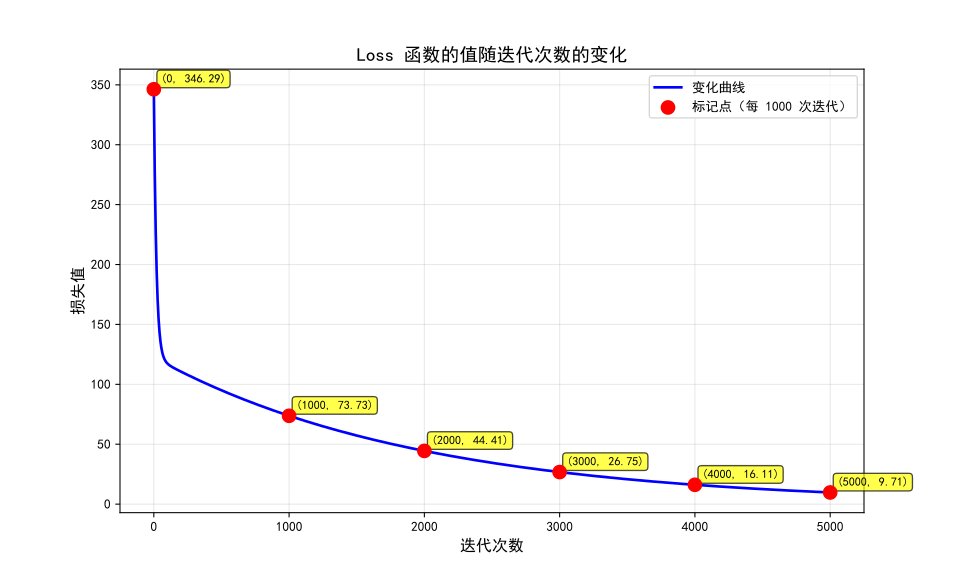
学习率 ,进行 5000 次迭代
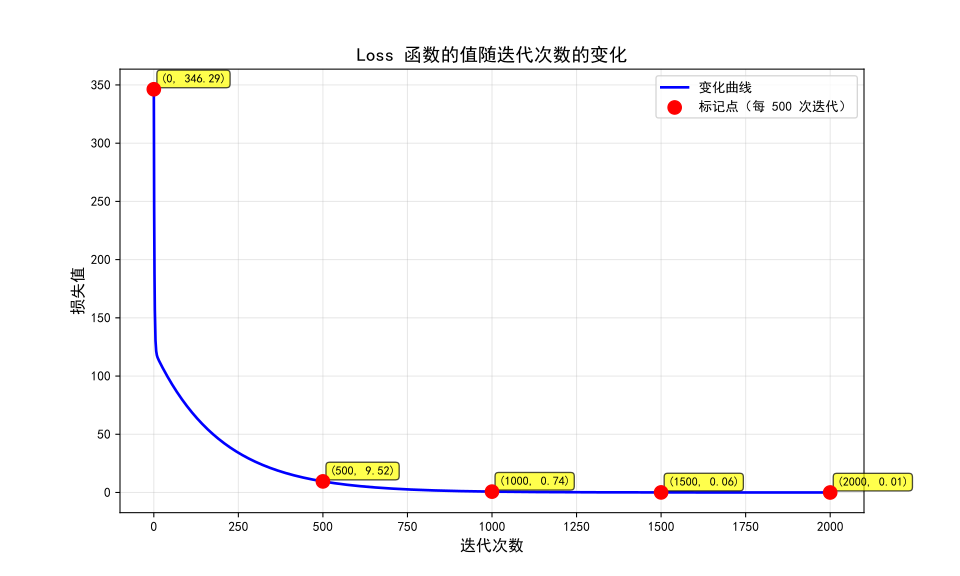
学习率 ,进行 2000 次迭代
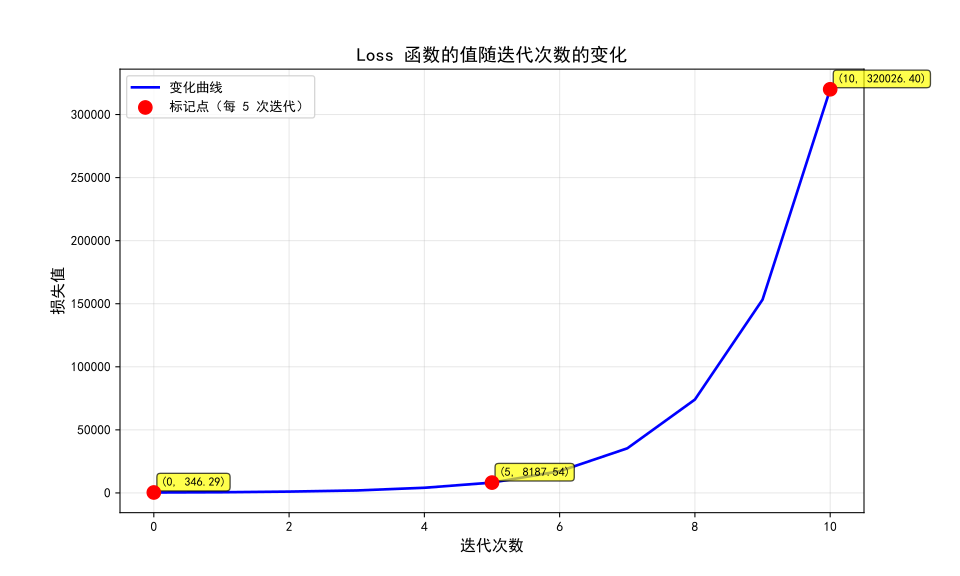
学习率 ,进行 10 次迭代
通过上述图像,可以发现:
- 过小时, 能够逐渐减小,但下降缓慢。
- 过大时,每一次迭代都会使 增大,且增大呈指数型趋势。
二、图像卷积与积分
0. 计算卷积
手动计算
一个手动计算卷积的技巧是,将两个数列的每一项两两相乘,填入表中,再沿对角线方向相加。
Python 实现
利用 numpy 和 scipy 库,可以求解两组离散数据的卷积:
import time
import numpy as np
import scipy.signal

# 生成 0 - 1 的随机浮点数
arr1 = np.random.random(100000)
arr2 = np.random.random(100000)

timerStart = time.perf_counter()
np.convolve(arr1, arr2)
timerEnd = time.perf_counter()
normalDuration = timerEnd - timerStart

timerStart = time.perf_counter()
scipy.signal.fftconvolve(arr1, arr2)
timerEnd = time.perf_counter()
fftDuration = timerEnd - timerStart

print(f"normal: {normalDuration:.6f}s FFT: {fftDuration:.6f}s")
且使用 FFT 算法求卷积更快:
normal: 19.289834s FFT: 0.007278s1. 卷积核
在图像处理中,我们可以把处理过的图像理解为 Kernel (内核) 与 原图像的卷积。
模糊核:
算子(用于边缘检测):
高斯内核(符合二维正态分布函数):
高斯内核对图像处理的效果也是模糊,称为高斯模糊。
现在,给出一个 像素的彩色图像:

编写代码,使用模糊核对该图像进行处理:
import numpy as np
from PIL import Image
from pathlib import Path

class imageConvolution:
    def __init__(self, imagePath):
        self.image = Image.open(imagePath)
        self.width, self.height = self.image.size # 记录图像大小
        self.originalPixels = {} # 原始 RGB 数据
        self.convolvedPixels = {} # 卷积后 RGB 数据
        self.kernel = np.array([
            [1/9, 1/9, 1/9],
            [1/9, 1/9, 1/9],
            [1/9, 1/9, 1/9]
        ])

    def loadPixels(self):
        image_rgb = self.image.convert('RGB')
        img_np = np.array(image_rgb)

        for y in range(self.height):
            for x in range(self.width):
                r, g, b = img_np[y, x] # (解包)读取单个像素的 RGB 值
                self.originalPixels[(x, y)] = (int(r), int(g), int(b))

        # --- DEBUG --- #
        print(image_rgb)
        print(img_np)
        # --- DEBUG --- #

        return self.originalPixels

    def applyConvolution(self):
        # 创建用于计算的 3 通道图像缓冲区,初始值为 0
        # 因为用了 1/9 的 kernel,使用 float32 可以安全保存计算的中间结果
        img_np = np.zeros((self.height, self.width, 3), dtype=np.float32)

        for y in range(self.height):
            for x in range(self.width):
                # numpy 和 PIL 的索引顺序不同,坐标顺序需转换
                img_np[y, x] = self.originalPixels[(x, y)]

        # 边界处理(拓宽)
        kernelSize = len(self.kernel)
        pad = kernelSize // 2 # 边界填充一层
        padded_img = np.pad(img_np, ((pad, pad), (pad, pad), (0, 0)), mode='edge')

        # 计算卷积
        convolved_img = np.zeros_like(img_np)
        for y in range(self.height):
            for x in range(self.width):
                # 3x3 邻域
                patch = padded_img[y:y+kernelSize, x:x+kernelSize, :]

                # 对 RGB 三个通道分别卷积
                for c in range(3):
                    convolved_img[y, x, c] = np.sum(patch[:, :, c] * self.kernel)

        convolved_img = np.clip(convolved_img, 0, 255).astype(np.uint8)

        # 存储像素
        for y in range(self.height):
            for x in range(self.width):
                r, g, b = convolved_img[y, x]
                self.convolvedPixels[(x, y)] = (int(r), int(g), int(b))

        return self.convolvedPixels

    def saveResult(self, outputPath):
        """保存卷积后的图像"""
        print(f"正在保存结果到 {outputPath}...")

        # 从卷积后的像素创建numpy数组
        result_array = np.zeros((self.height, self.width, 3), dtype=np.uint8)

        for (x, y), (r, g, b) in self.convolvedPixels.items():
            result_array[y, x] = [r, g, b]

        # 创建并保存图像
        result_image = Image.fromarray(result_array, 'RGB')
        result_image.save(outputPath)
        print(f"图像已保存到 {outputPath}")
        return outputPath

def main():
    fileName = "taiko.png"
    inputPath = Path(__file__).parent/fileName
    outputPath = Path(__file__).parent / "convolved_taiko.png"

    try:
        processor = imageConvolution(inputPath)
        processor.loadPixels()
        processor.applyConvolution()
        processor.saveResult(outputPath)

        print("\nConvolution Completed.")
    except FileNotFoundError:
        print(f"Current diretory: {__file__}")
        print(f"Cannot found file '{inputPath}'")

if __name__ == "__main__":
    main()
正如这个 Kernel 的名字“模糊核”,处理后的图像是:

运用其他内核,可以实现不同效果。