一、线性回归与导数
1. 数据准备
这是2026年2月中国大陆二手车市场2023款 Tesla Model 3 后轮驱动版不同里程的估算成交价:
Sample ID
Mileage(10k km)
Price(10k RMB)
1
0.5
21.8
2
1.2
21.1
3
2.0
20.4
4
3.1
19.5
5
3.9
18.9
6
4.8
18.2
7
5.5
17.5
8
6.2
16.9
9
7.5
15.8
10
8.8
14.7
(数据参考多个二手车平台,由 AI 生成)
2. 定义损失函数
对于行驶里程和二手成交价两个变量,可以用一元线性回归模型来预测;其中,β 0 \beta_0 β 0 截距 (Intercept),β 1 \beta_1 β 1 回归系数 (Regression Coefficient)。
y = β 0 + β 1 x y = \beta_0 + \beta_1x
y = β 0 + β 1 x
使用均方误差 ,衡量预测值和真实值间的差距(损失函数):
Loss = ∑ i = 1 n ( y i − ( β 0 + β 1 x i ) ) 2 n \text{Loss} = \large\frac{\sum\limits^{n}_{i=1}(y_i-(\beta_0+\beta_1x_i))^2}{n}
Loss = n i = 1 ∑ n ( y i − ( β 0 + β 1 x i ) ) 2
3. 数学推导
Loss \text{Loss} Loss β 0 \beta_0 β 0 β 1 \beta_1 β 1
Loss β 0 ′ = 2 ∑ i = 1 n ( β 0 + x i β 1 − y i ) Loss β 1 ′ = 2 ∑ i = 1 n ( x i ( x i β 1 + β 0 − y i ) ) \text{Loss}'_{\beta_0} = 2\sum\limits^{n}_{i=1}(\beta_0+x_i\beta_1-y_i)
\newline
\text{Loss}'_{\beta_1} = 2\sum\limits^{n}_{i=1}(x_i(x_i\beta_1+\beta_0-y_i))
Loss β 0 ′ = 2 i = 1 ∑ n ( β 0 + x i β 1 − y i ) Loss β 1 ′ = 2 i = 1 ∑ n ( x i ( x i β 1 + β 0 − y i ))
下文使用的偏导公式将忽略常数 :
∂ Loss ∂ β 0 = ∑ i = 1 n ( β 0 + x i β 1 − y i ) ∂ Loss ∂ β 1 = ∑ i = 1 n ( x i ( x i β 1 + β 0 − y i ) ) \frac{\partial\text{Loss}}{\partial\beta_0} = \sum\limits^{n}_{i=1}(\beta_0+x_i\beta_1-y_i)
\newline
\frac{\partial\text{Loss}}{\partial\beta_1} = \sum\limits^{n}_{i=1}(x_i(x_i\beta_1+\beta_0-y_i))
∂ β 0 ∂ Loss = i = 1 ∑ n ( β 0 + x i β 1 − y i ) ∂ β 1 ∂ Loss = i = 1 ∑ n ( x i ( x i β 1 + β 0 − y i ))
4. 手动迭代
规定初始参数 β 1 = 0 , β 0 = 0 \beta_1 = 0 , \beta_0 = 0 β 1 = 0 , β 0 = 0
规定学习率 η = 0.001 \eta = 0.001 η = 0.001 β 1 \beta_1 β 1 β 0 \beta_0 β 0
β 1 ′ = β 1 − η ∂ Loss ∂ β 1 β 0 ′ = β 0 − η ∂ Loss ∂ β 0 \beta_1' = \beta_1 - \eta \frac{\partial\text{Loss}}{\partial\beta_1}
\newline
\beta_0' = \beta_0 - \eta \frac{\partial\text{Loss}}{\partial\beta_0}
β 1 ′ = β 1 − η ∂ β 1 ∂ Loss β 0 ′ = β 0 − η ∂ β 0 ∂ Loss
由上文推导出的公式,编写 Python 代码:
1
2
3
4
5
6
7
8
9
10
11
12
13
14
15
16
17
18
19
20
21
22
23
24
25
26
27
28
29
30
31
32
33
34
35
36
37
38
39
40
41
42
43
44
45
46
47
48
49
50
51
52
53
54
55
56
57
58
59
60
61
62
63
64
class LinearRegression :def __init__ (self, indV=[], dV=[], beta0=1 , beta1=1 ):self .indV = indVself .dV = dVself .beta0 = beta0self .beta1 = beta1def Loss (self ):""" 损失函数 """ len (self .indV)0 1 for val_x, val_y in zip (self .indV, self .dV):self .beta0 + self .beta1 * val_x)) ** 2 return resultdef partialFormula_beta0 (self ):""" beta0的偏导公式 """ 0 for val_x, val_y in zip (self .indV, self .dV):self .beta0 + val_x*self .beta1 - val_yreturn resultdef partialFormula_beta1 (self ):""" beta1的偏导公式 """ 0 for val_x, val_y in zip (self .indV, self .dV):self .beta1 + self .beta0 - val_y)return resultdef iterateBeta0 (self, eta ):""" 迭代beta0 """ self .beta0 = self .beta0 - eta * self .partialFormula_beta0()def iterateBeta1 (self, eta ):""" 迭代beta1 """ self .beta1 = self .beta1 - eta * self .partialFormula_beta1()def main ():0.5 , 1.2 , 2.0 , 3.1 , 3.9 , 4.8 , 5.5 , 6.2 , 7.5 , 8.8 ]21.8 , 21.1 , 20.4 , 19.5 , 18.9 , 18.2 , 17.5 , 16.9 , 15.8 , 14.7 ]0 0 0.001 for i in range (2001 ):if i % 100 == 0 :print (f"No.{i} Result: {mileagePrice.Loss():.6 f} " )if __name__ == "__main__" :
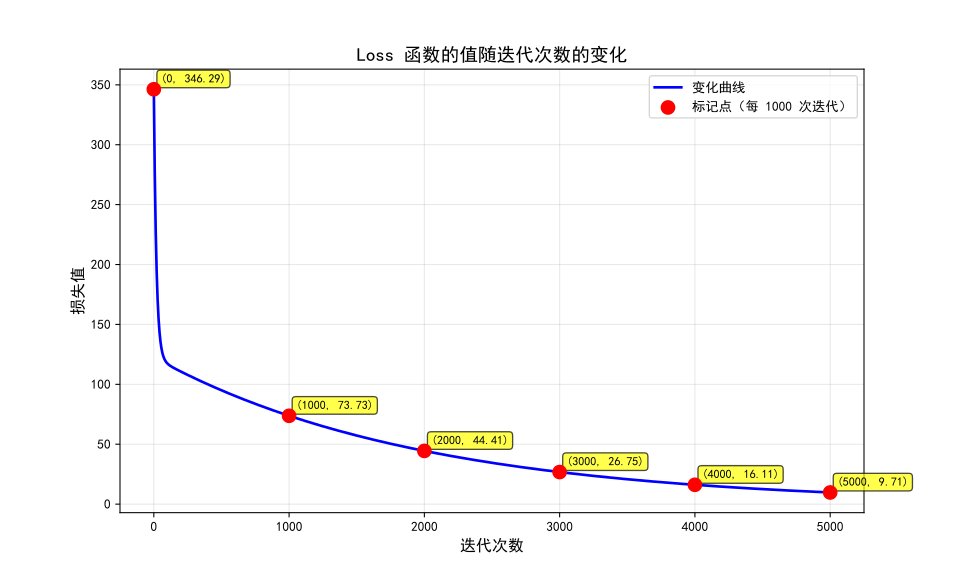
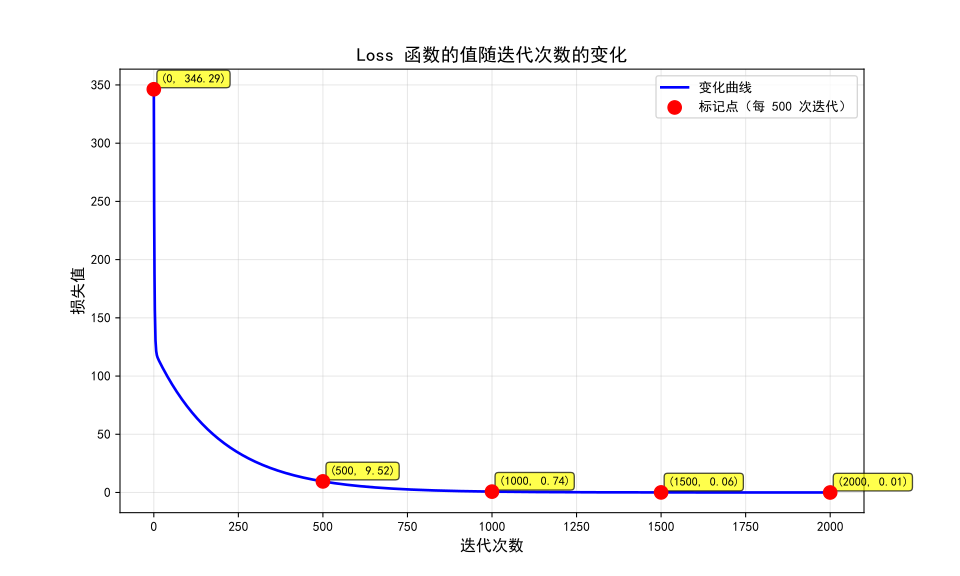
根据该规则迭代 2000 次,每 100 次迭代输出一行 Loss \text{Loss} Loss
1
2
3
4
5
6
7
8
9
10
11
12
13
14
15
16
17
18
19
20
21
No .0 Result: 346 .290000 No .100 Result: 73 .419997 No .200 Result: 44 .051911 No .300 Result: 26 .431486 No .400 Result: 15 .859486 No .500 Result: 9 .516439 No .600 Result: 5 .710703 No .700 Result: 3 .427316 No .800 Result: 2 .057317 No .900 Result: 1 .235338 No .1000 Result: 0 .742162 No .1100 Result: 0 .446264 No .1200 Result: 0 .268729 No .1300 Result: 0 .162211 No .1400 Result: 0 .098301 No .1500 Result: 0 .059957 No .1600 Result: 0 .036950 No .1700 Result: 0 .023147 No .1800 Result: 0 .014865 No .1900 Result: 0 .009896 No .2000 Result: 0 .006915
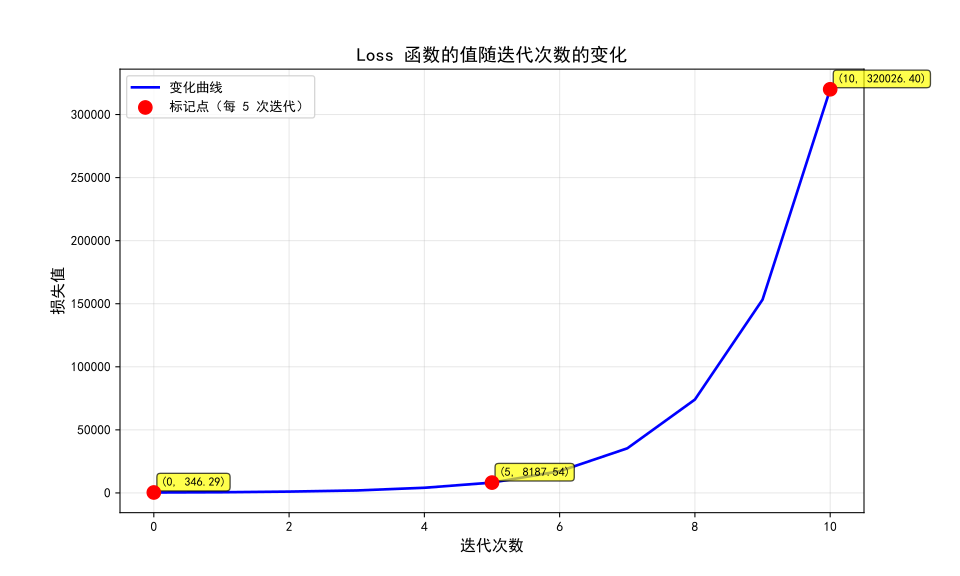
改变 η \eta η Loss \text{Loss} Loss
学习率 η = 10 − 4 \eta = 10^{-4} η = 1 0 − 4
学习率 η = 10 − 3 \eta = 10^{-3} η = 1 0 − 3
学习率 η = 10 − 2 \eta = 10^{-2} η = 1 0 − 2
通过上述图像,可以发现:
η \eta η Loss \text{Loss} Loss η \eta η Loss \text{Loss} Loss
二、图像卷积与积分
0. 计算卷积
手动计算
( 1 , 2 , 3 ) ∗ ( 4 , 5 , 6 , 7 ) = ( 4 , 13 , 28 , 34 , 32 , 21 ) (1, 2, 3) * (4, 5, 6, 7) = (4, 13, 28, 34, 32, 21)
( 1 , 2 , 3 ) ∗ ( 4 , 5 , 6 , 7 ) = ( 4 , 13 , 28 , 34 , 32 , 21 )
一个手动计算卷积的技巧是,将两个数列的每一项两两相乘,填入表中,再沿对角线方向相加。
Python 实现
利用 numpy 和 scipy 库,可以求解两组离散数据的卷积:
1
2
3
4
5
6
7
8
9
10
11
12
13
14
15
16
17
18
19
import timeimport numpy as npimport scipy.signal100000 )100000 )print (f"normal: {normalDuration:.6 f} s FFT: {fftDuration:.6 f} s" )
且使用 FFT 算法求卷积更快:
1 normal : 19 .289834 s FFT: 0 .007278 s
1. 卷积核
在图像处理中,我们可以把处理过的图像理解为 Kernel (内核) 与 原图像的卷积 。
模糊核:
K = 1 9 [ 1 1 1 1 1 1 1 1 1 ] K = \frac{1}{9}\begin{bmatrix}
1 & 1 & 1 \\
1 & 1 & 1 \\
1 & 1 & 1
\end{bmatrix}
K = 9 1 1 1 1 1 1 1 1 1 1
Sabel \text{Sabel} Sabel
K = [ − 1 0 1 − 2 0 2 − 1 0 1 ] K = \begin{bmatrix}
-1 & 0 & 1 \\
-2 & 0 & 2 \\
-1 & 0 & 1
\end{bmatrix}
K = − 1 − 2 − 1 0 0 0 1 2 1
高斯内核(符合二维正态分布函数):
K = 1 273 [ 1 4 7 4 1 4 16 26 16 4 7 26 41 26 7 4 16 26 16 4 1 4 7 4 1 ] K = \frac{1}{273} \begin{bmatrix}
1 & 4 & 7 & 4 & 1 \\
4 & 16 & 26 & 16 & 4 \\
7 & 26 & 41 & 26 & 7 \\
4 & 16 & 26 & 16 & 4 \\
1 & 4 & 7 & 4 & 1
\end{bmatrix}
K = 273 1 1 4 7 4 1 4 16 26 16 4 7 26 41 26 7 4 16 26 16 4 1 4 7 4 1
高斯内核对图像处理的效果也是模糊,称为高斯模糊。
现在,给出一个 50 × 50 50 \times 50 50 × 50
编写代码,使用模糊核 对该图像进行处理:
1
2
3
4
5
6
7
8
9
10
11
12
13
14
15
16
17
18
19
20
21
22
23
24
25
26
27
28
29
30
31
32
33
34
35
36
37
38
39
40
41
42
43
44
45
46
47
48
49
50
51
52
53
54
55
56
57
58
59
60
61
62
63
64
65
66
67
68
69
70
71
72
73
74
75
76
77
78
79
80
81
82
83
84
85
86
87
88
89
90
91
92
93
94
95
96
97
98
99
100
101
102
import numpy as npfrom PIL import Imagefrom pathlib import Pathclass imageConvolution :def __init__ (self, imagePath ):self .image = Image.open (imagePath)self .width, self .height = self .image.size self .originalPixels = {} self .convolvedPixels = {} self .kernel = np.array([1 /9 , 1 /9 , 1 /9 ],1 /9 , 1 /9 , 1 /9 ],1 /9 , 1 /9 , 1 /9 ]def loadPixels (self ):self .image.convert('RGB' )for y in range (self .height):for x in range (self .width):self .originalPixels[(x, y)] = (int (r), int (g), int (b))print (image_rgb)print (img_np)return self .originalPixelsdef applyConvolution (self ):self .height, self .width, 3 ), dtype=np.float32)for y in range (self .height):for x in range (self .width):self .originalPixels[(x, y)]len (self .kernel)2 0 , 0 )), mode='edge' )for y in range (self .height):for x in range (self .width):for c in range (3 ):sum (patch[:, :, c] * self .kernel)0 , 255 ).astype(np.uint8)for y in range (self .height):for x in range (self .width):self .convolvedPixels[(x, y)] = (int (r), int (g), int (b))return self .convolvedPixelsdef saveResult (self, outputPath ):"""保存卷积后的图像""" print (f"正在保存结果到 {outputPath} ..." )self .height, self .width, 3 ), dtype=np.uint8)for (x, y), (r, g, b) in self .convolvedPixels.items():'RGB' )print (f"图像已保存到 {outputPath} " )return outputPathdef main ():"taiko.png" "convolved_taiko.png" try :print ("\nConvolution Completed." )except FileNotFoundError:print (f"Current diretory: {__file__} " )print (f"Cannot found file '{inputPath} '" )if __name__ == "__main__" :
正如这个 Kernel 的名字“模糊核”,处理后的图像是:
运用其他内核,可以实现不同效果。